I built a simple Ad-blocker extension for Google Chrome. It allows you to target specific ads on specific web pages to block. It also makes it easier to find the right selector when web scraping data elements on a site.
Check it out on my GitHub: here
Introduction
The AdBlock extension on the Chrome Web Store has 62 million users with 4.5 stars and over 290,000 reviews.
I have been using it for a while, and it's really excellent.
However, there are a couple of issues with it:
- It indiscriminately blocks all ads from all pages - while this is great for most people, some users may want to see some ads (especially ad-based search results)
- Sometimes it automatically opens up a new tab, displaying a page that asks you to upgrade to premium (they probably deserve it for all of the garbage they have blocked from my eyes)
- Some websites now detect ad-blockers and show a 'Disable Adblocker' screen that is sometimes impossible to bypass
Given that nowadays it has become so easy to generate useful apps with coding agents, I decided to take a stab at implementing a simple ad-blocking extension.
Usage
The extension is a bit more advanced to use compared to most ad-blockers available on the Chrome Web Store. But if you're familiar with HTML and DOM structures, it's pretty simple. 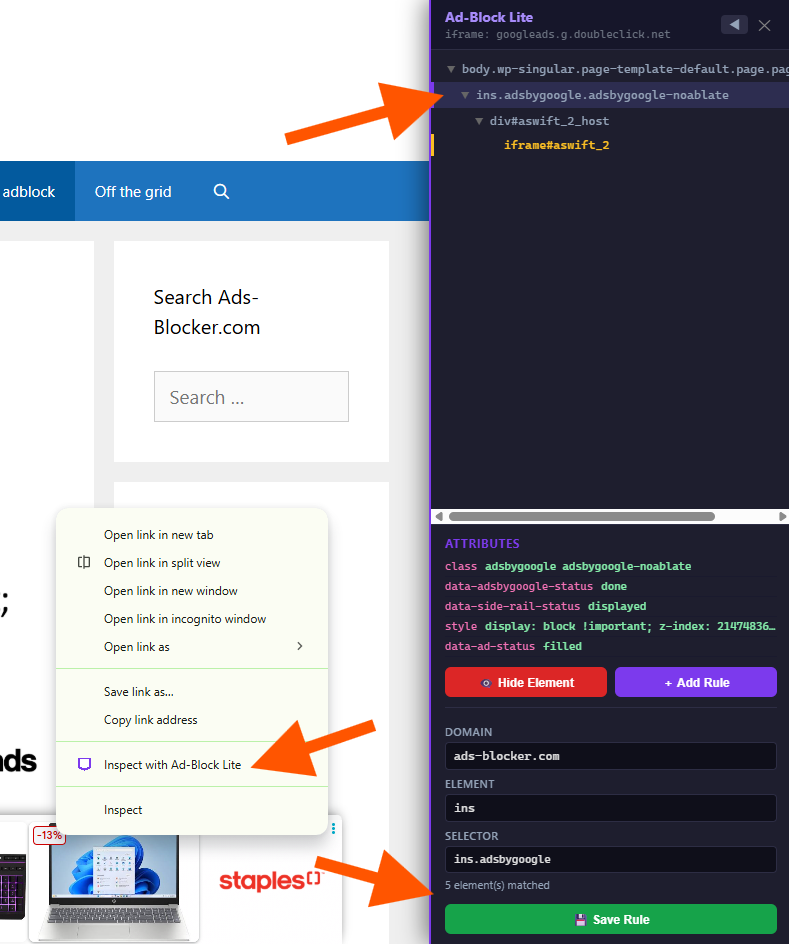
When you right click an element on a webpage, you’ll see an option in the context menu labeled "Inspect with Ad-Block Lite". When you click it, you'll get a panel that comes up on the right. From here, you can see where that element is situated in the DOM (It shows that element's parent and child nodes).
From there, you can choose the proper DOM element to add to your rule, and then add the rule by defining a selector based on the item's attributes.
Once added, the rule will appear in your custom rules list, which you can access by right clicking the extension in the Chrome Extensions menu -> Options. You'll be taken to this page:
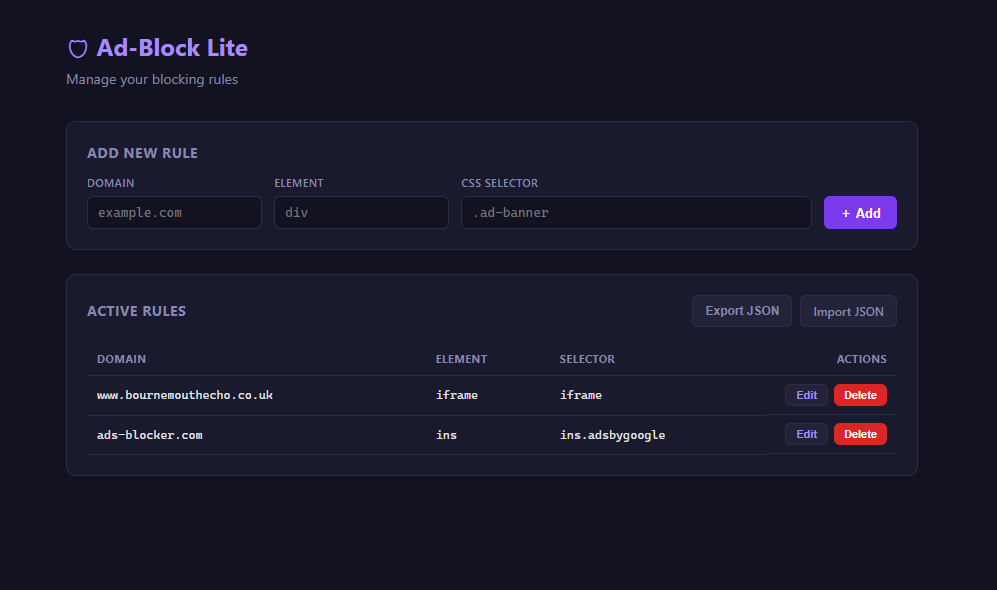
From here, you can manually add, remove or edit rules. You can save and import rule sets as well.
This extension also helps me when building web scrapers. Instead of going through many elements in Chrome's "Element Inspector" to find the perfect node and attribute to use as an anchor for web scraping a particular data field, this helps you quickly locate a proper one (moving between child and parent elements to find something with a robust selector).
Conclusion
This app is a great example of how you can take a piece of software you already like, strip away the features you find distracting or unnecessary, and build a simpler, personalized version that better fits your needs. Thanks to the new AI coding agents, projects like this are more accessible than ever. If you have a piece of software that you enjoy, but wish was less cluttered, or didn't have annoying ads, this approach could work for you.
Feel free to try out the app. Installation instructions are included on the GitHub. If you run into any issues, feel free to reach out.